Ramp
A source unit that generates a smooth transition between a starting value and an ending
value over a given duration. The transition begins when start() is called, and the
ramp’s current value can be read or piped to an output at any time.
Parameters
Name |
Description |
Range |
Setter |
Getter |
Flow |
|---|---|---|---|---|---|
duration |
Duration of the ramp transition (in seconds). |
> 0 |
|
|
|
speed |
Rate of change (change-per-second). |
> 0 |
|
|
|
Events
When |
Trigger |
Callback |
|---|---|---|
Timed process completes |
|
|
Basic Usage
A ramp is defined by three values:
from()is the value at which the ramp starts (default: 0)
to()is the value where the ramp ends (default: 1)
duration()is the duration the ramp takes to go fromfromtoto
It can then be started by calling the start() function.
Tip
As an alternative to duration, one can use the speed parameter instead to
specify transition time in values-per-seconds. This is useful when we want to maintain
a stable rate of change when the from and to values change, such as when
controlling servo-motors.
Example
Pressing a button below triggers a two-second fade from off to full brightness:
#include <Plaquette.h>

Ramp fader(2.0); // 2-second ramp, from 0 to 1 by default

AnalogOut led(9);
DigitalIn button(2, INTERNAL_PULLUP);

void step() {
  // Press button to trigger the fade.
  if (button.rose())
    fader.start();

  // Flow ramp value to LED.
  fader >> led;
}
Easing
Ramps support easing functions to shape the transition curve for more expressive effects.
Passing an easing function to easing() applies it to all subsequent transitions.
Please refer to this page for a full list of available easing functions.
Starting from the example above, add the following begin() function to specify an
easing function. Easting easeInSine makes the fade start slowly and accelerate.
void begin() {
  fader.easing(easeInSine); // slow start, accelerating towards the end
}
Changing End Points
The starting value (from) and ending value (to) can be changed to produce
different transitions. Setting from to 1.0 and to to 0.0 reverses the direction,
fading the LED from full brightness down to off:
void begin() {
  fader.fromTo(1.0, 0.0); // changes both from (1.0) and to (0.0)
}
Values do not need to stay withing [0, 1], they can take any values.
Example
This example uses a metronome to trigger a ramp. The ramp controls the frequency of a blinking LED.
#include <Plaquette.h>

Ramp fader(5.0); // 5-second ramp

Wave wave(SQUARE); // square wave
DigitalOut led(13); // blinking LED

Metronome metro(7.5); // 7.5-second metro

void begin() {
  fader.fromTo(2, 10); // ramp from 2 Hz to 10 Hz
}

void step() {
  // Metronome triggers the ramp.
  if (metro)
    fader.start();

  // Flow ramp value wave frequency.
  fader >> wave.Frequency();

  // Blink LED.
  wave >> led;
}
The go() Function
The go() function provides a simple way to immediately launch a ramp from the current value to another,
or simply from the current value towards a new goal. It sets to and duration or speed in a single
call and immediately starts the transition from the current value.
The two main forms are:
go(to): transition from the ramp’s current value totousing the current duration or speed.go(to, durationOrSpeed): transition from the ramp’s current value totoindurationseconds ORspeed, depending on the current mode
Tip
An optional easing function can be passed as the last argument of any go() call. For example,
go(2.0, easeInSine) and go(2.0, 3.0, easeInSine) go to value 2.0 using easing function easeInSine
(3.0 is the value of duration or speed in the second version).
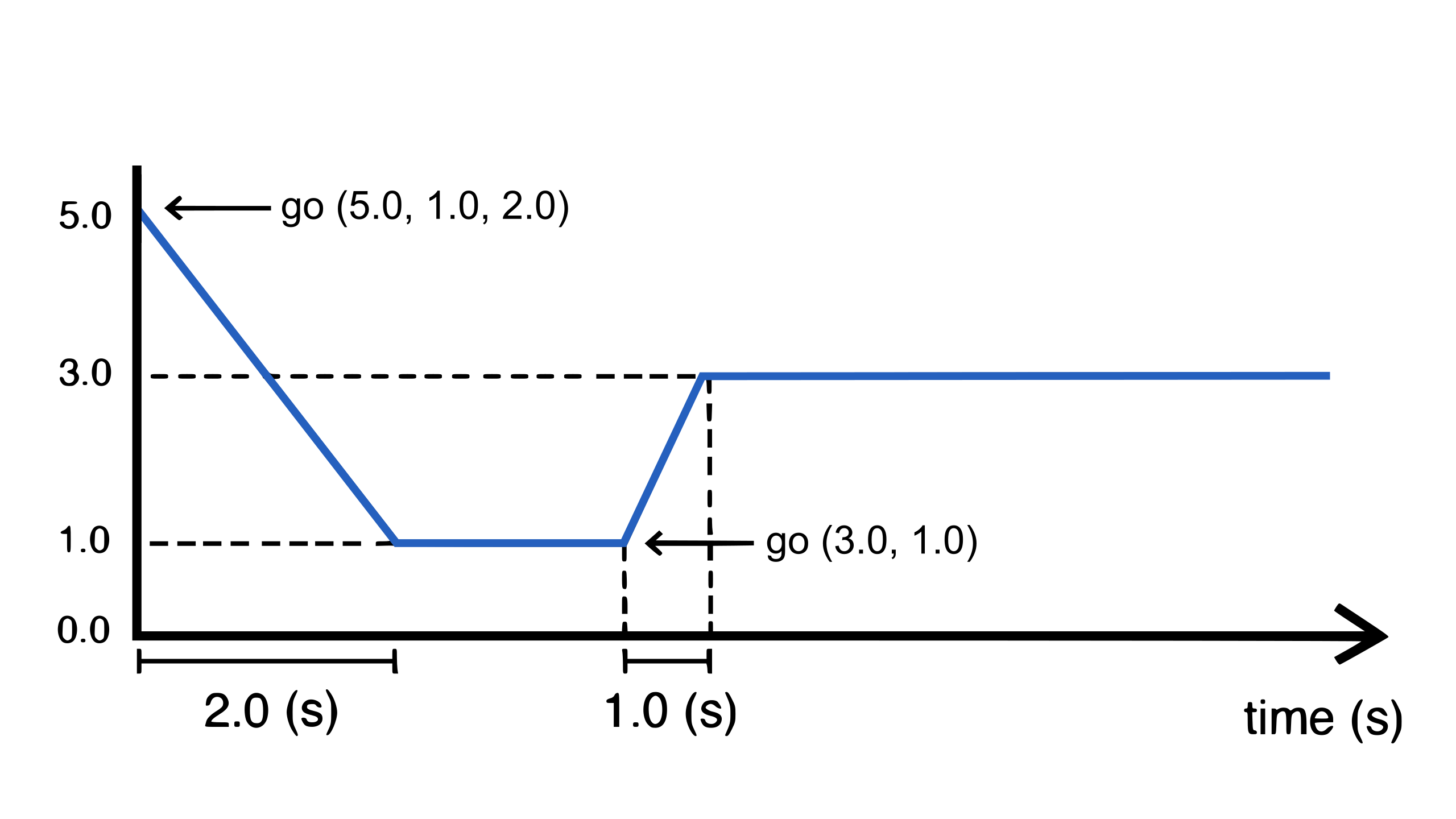
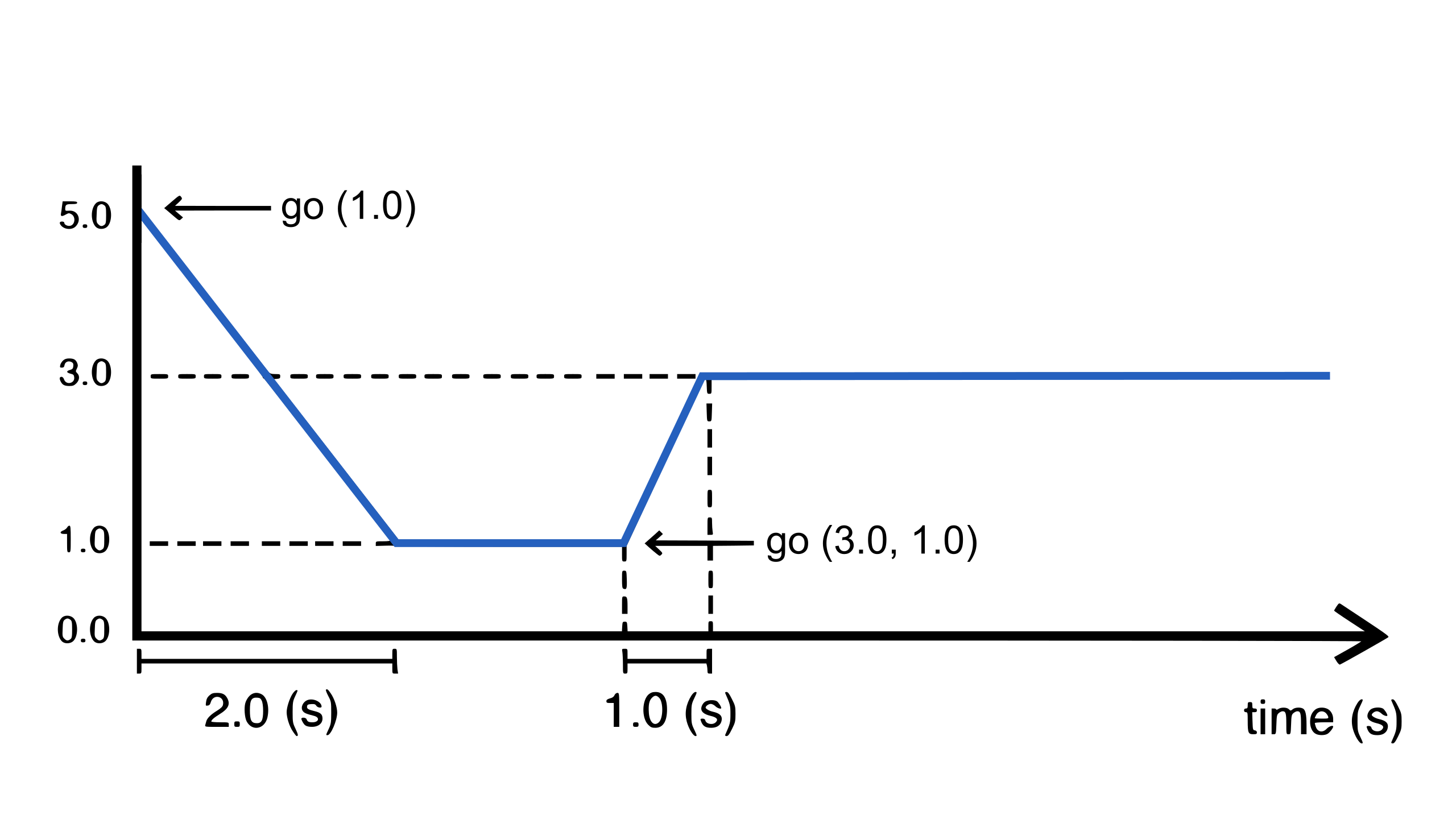
- The following diagram shows what happens to a ramp signal:
Initially the ramp is at value 5.0 with duration of 2.0 seconds.
Calling
go(1.0)starts a ramp from 5.0 to 1.0, using current duration of 2.0 seconds.Later, calling
go(3.0, 1.0)starts ramping from current value to value 3.0, overriding duration with a 1.0 second duration.
Example
The example below uses go() to create a continuous random walk, chaining from the
current value to a new random target each time the previous transition completes. It uses
speed instead of duration.
#include <Plaquette.h>

Ramp zigZagRamp;

Plotter plotter(115200);

void begin() {
  // Set speed to 1.0 per second.
  zigZagRamp.speed(1.0);
  // Apply an easing function (optional).
  zigZagRamp.easing(easeOutSine);
  // Go from zero (initial value) to a random value.
  zigZagRamp.go( randomFloat(-10.0, 10.0) );
}

void step() {
  if (zigZagRamp.finished()) // event: ramp finished
  {
    // Ramp from current value to new random value, increasing speed by 1 each time.
    zigZagRamp.go(zigZagRamp + randomFloat(-10.0, 10.0), zigZagRamp.speed() + 1);
  }

  // Send ramp value to plotter for visualization.
  zigZagRamp >> plotter;
}
Ramp as a Timer
A ramp can be used as a timer (like an analog version of Alarm). By default, ramp goes from 0 to 1 (0% to 100%) over a given duration. The ramp can thus be used as a measure of progress over time. The example below uses the ramp value to cycle through four phases, changing the frequency of a LED pulse at each transition:
#include <Plaquette.h>

// Ramp over 5 seconds. Default ramp always runs from 0 to 1.
Ramp timer(5.0);

// Square wave oscillator driving the LED.
Wave pulse(SQUARE);

// Built-in LED.
DigitalOut led(LED_BUILTIN);

void begin() {
  timer.start(); // start the timer
}

void step() {
  // Change wave frequency based on progress thresholds.
  if (timer < 0.25) {
    pulse.frequency(0.5);  // slow pulse: warming up
  }
  else if (timer < 0.5) {
    pulse.frequency(3.0);  // fast pulse: running
  }
  else if (timer < 0.75) {
    pulse.frequency(1.0);  // medium pulse: cooling down
  }
  else {
    pulse.frequency(0.25); // very slow pulse: standby
  }

  // Flow wave to LED.
  pulse >> led;

  // Restart the timer when it completes, increasing duration each time.
  if (timer.finished()) {
    timer.duration( timer.duration() + 5 );
    timer.start();
  }
}
Reference
-
class Ramp : public pq::Unit, public pq::AbstractTimer
Provides a ramping / tweening mechanism that allows smooth transitions between two values.
Public Functions
-
Ramp(Engine &engine = Engine::primary())
Constructor.
- Parameters
engine – the engine running this unit
-
Ramp(float duration, Engine &engine = Engine::primary())
Constructor with duration.
- Parameters
duration – duration of the ramp
engine – the engine running this unit
-
virtual float get()
Returns value of ramp.
-
virtual float put(float value)
Forces value in the ramp.
If this happens while the ramp is running, it will interrupt the ramp.
- Parameters
value – the value sent to the unit
- Returns
the new value of the unit
-
virtual float mapTo(float toLow, float toHigh)
Maps value to new range.
-
void easing(easing_function easing)
Sets easing function to apply to ramp.
- Parameters
easing – the easing function
-
inline void noEasing()
Remove easing function (linear/no easing).
-
inline virtual float to() const
Returns destination value of the ramp,.
-
virtual void to(float to)
Assigns destination value of the ramp, starting from current value.
- Parameters
to – the final value
-
inline virtual float from() const
Returns initial value of the ramp.
-
virtual void from(float from)
Assign initial value of the ramp.
- Parameters
from – the initial value
-
virtual void fromTo(float from, float to)
Assign initial and final values of the ramp.
- Parameters
from – the initial value
to – the final value
-
inline virtual float duration() const override
Returns the duration of the ramp (in seconds).
-
virtual void duration(float duration) override
Sets the duration of the ramp (in seconds).
-
virtual void speed(float speed)
Sets the speed (rate of change) of the ramp in change-per-second.
-
virtual float speed() const
Returns speed (rate of change) of the ramp in change-per-second.
-
inline Parameter Speed()
Returns speed (rate of change) as a parameter.
-
virtual void start()
Starts/restarts the ramp. Will repeat the last ramp.
-
virtual void go(float from, float to, float durationOrSpeed, easing_function easing = 0)
Starts a new ramp.
- Parameters
from – the initial value
to – the final value
durationOrSpeed – the duration of the ramp (in seconds) or speed (in change-per-second) depending on mode
easing – the easing function (optional).
-
virtual void go(float to, float durationOrSpeed, easing_function easing = 0)
Starts a new ramp, starting from current value.
- Parameters
to – the final value
durationOrSpeed – the duration of the ramp (in seconds) or speed (in change-per-second) depending on mode
easing – the easing function (optional)
-
virtual void go(float to, easing_function easing = 0)
Starts a new ramp, starting from current value (keeping the same duration/speed).
- Parameters
to – the final value
easing – the easing function (optional)
-
virtual void mode(uint8_t mode)
Changes the mode of the component (RAMP_DURATION or RAMP_SPEED).
-
inline uint8_t mode() const
Returns the mode of the component (RAMP_DURATION or RAMP_SPEED).
-
inline virtual bool finished()
Returns true iff the ramp just finished its process this step.
-
inline virtual void onFinish(EventCallback callback)
Registers event callback on finish event.
-
virtual void setTime(float time)
Forces current time (in seconds).
-
float durationToSpeed(float duration) const
Returns speed based on duration.
-
float speedToDuration(float speed) const
Returns duration based on speed.
-
virtual void start(float to, float durationOrSpeed, easing_function easing = 0)
- Deprecated:
-
virtual void start(float from, float to, float durationOrSpeed, easing_function easing = 0)
- Deprecated:
-
inline float seconds() const
Returns engine time in seconds.
-
inline uint32_t milliSeconds() const
Returns engine time in milliseconds.
-
inline uint64_t microSeconds() const
Returns engine time in microseconds.
-
inline unsigned long nSteps() const
Returns number of engine steps.
-
inline float sampleRate() const
Returns engine sample rate.
-
inline float samplePeriod() const
Returns enginesample period.
-
inline operator float()
Object can be used directly to access its value.
-
inline explicit operator bool()
Operator that allows usage in conditional expressions.
-
virtual void start(float duration)
Starts/restarts the chronometer with specific duration.
-
inline virtual Parameter Duration()
Returns duration as a parameter.
-
virtual float progress() const
The progress of the timer process (in %).
-
inline virtual bool isFinished() const
Returns true iff the chronometer has finished its process.
-
inline virtual bool isComplete() const
- Deprecated:
-
virtual void pause()
Interrupts the chronometer.
-
virtual void resume()
Resumes process.
-
inline virtual float elapsed() const
The time currently elapsed by the chronometer (in seconds).
-
virtual bool hasPassed(float timeout) const
Returns true iff elapsed time has passed given timeout.
-
virtual bool hasPassed(float timeout, bool restartIfPassed)
- Deprecated:
Returns true iff elapsed time has passed given timeout (optional argument to automatically restart if true).
-
virtual void addTime(float time)
Adds/subtracts time to the chronometer.
-
inline virtual bool isRunning() const
Returns true iff the chronometer is currently running.
-
inline bool isStarted() const
- Deprecated:
-
virtual void stop()
Interrupts and resets to zero.
-
virtual void togglePause()
Toggles pause/unpause.
-
Ramp(Engine &engine = Engine::primary())