RobustScaler
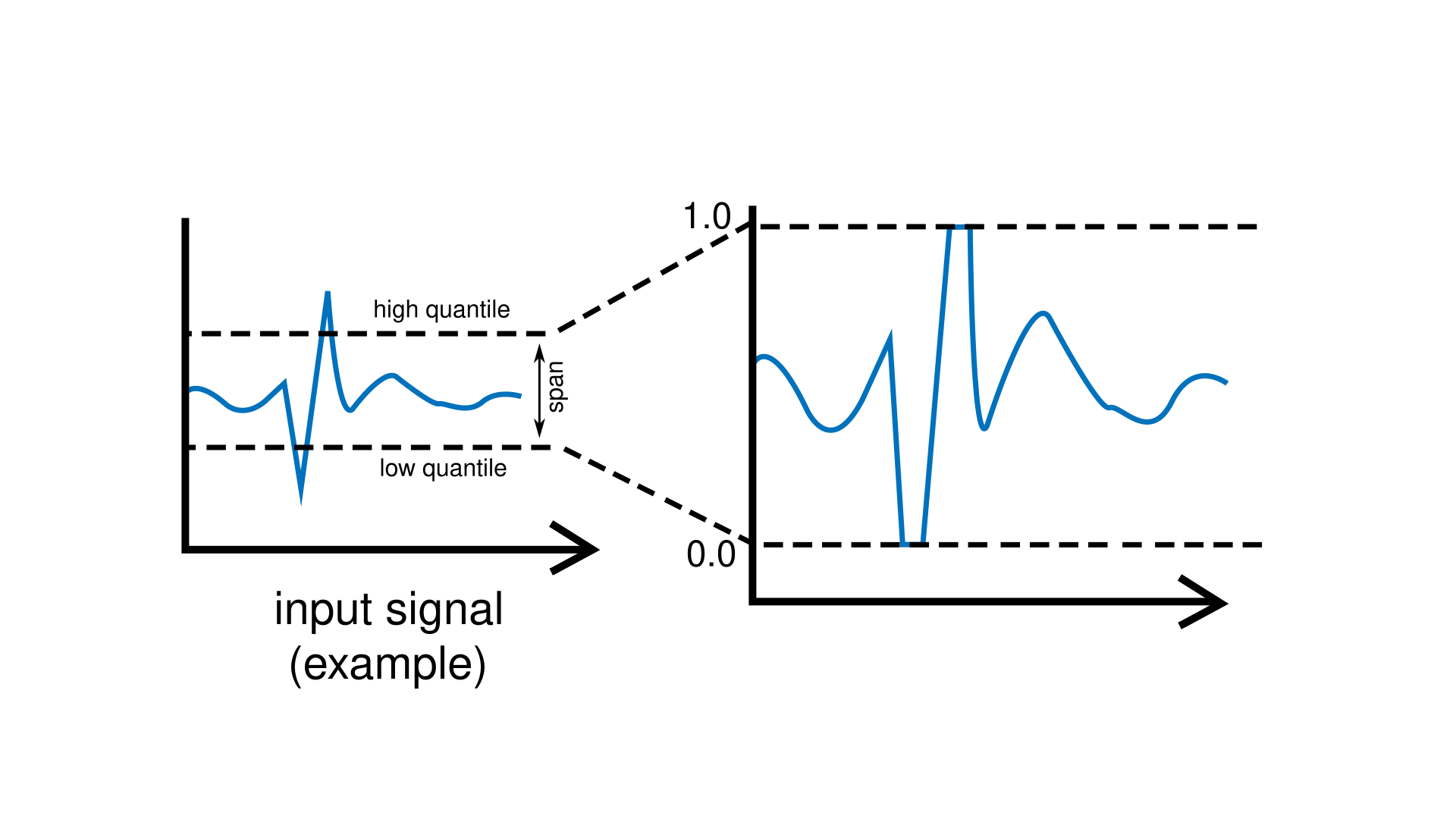
This filtering unit regularizes incoming signals by remapping them into a new interval of [0, 1]. It focuses on what the signal does most of the time instead of reacting to rare extreme values. It does this by keeping track of two boundaries:
a lower boundary (low quantile), below which the signal almost never goes, and
an upper boundary (high quantile), above which the signal almost never goes.
You can think of these as “typical low” and “typical high” values. Once these boundaries are known, the signal is rescaled so that the lower boundary becomes 0 and the upper boundary becomes 1.
Because it pays attention to the typical behaviour of the signal, while ignoring rare
spikes or sudden jumps, the RobustScaler is a good choice for noisy sensors,
biological signals, or any data that behaves unpredictably.
Adjusting Robustness
The span controls how much of your data is considered “typical” and placed between the two boundaries.
A span of 0.8 (80%) means that the scaler tries to place about 80% of the most common values between its lower and upper boundaries.
A span of 0.95 (95%) means it tries to place about 95% of values there, and so on.
You can set it in code like this:
RobustScaler scaler;
scaler.span(0.8);  // Keep about 80% of values between 0 and 1.
Intuition
A good way to understand the span is to imagine a corridor in which your signal is allowed to move. The span controls how wide that corridor is.
Higher span (e.g. 0.9 or 0.95) This corresponds to a wide corridor: most of the signal’s behaviour fits comfortably inside it. The scaler becomes more resistant to spikes or sudden jumps, but extreme values will simply hit the corridor walls and stay clamped near 0 or 1.
Lower span (e.g. 0.6 or 0.7) This corresponds to a narrow corridor: the scaler pays attention to a smaller core of typical values. It reacts more strongly to changes, but even moderate deviations may be treated as if they were already “far out.”
Choosing a span is therefore a balance between robustness (wide corridor, large span) and sensitivity (narrow corridor, small span).
Example
Filters input values from a noisy sensor. The scaler adapts to the usual behaviour of the signal but ignores occasional spikes. An LED turns on when the signal goes beyond the upper “typical” range.
#include <Plaquette.h>

// Example: noisy analog sensor.
AnalogIn sensor(A0);

// Creates a robust scaler.
RobustScaler scaler;

// Simple square wave.
Wave wave;

// LED output.
DigitalOut led(13);

void begin() {
  // Sets span to 90%.
  scaler.span(0.9);
}

void step() {
  // Rescale value based on typical low/high ranges.
  sensor >> scaler;

  // Adjust period based on rescaled value.
  wave.period(scaler.mapTo(0.5, 2));

  // Blink LED.
  wave >> led;
}
Note
For readers familiar with statistics: the RobustScaler functions by
estimating two quantiles of the incoming signal. If the span is s,
the scaler computes:
a lower quantile at
(1 - s) / 2, andan upper quantile at
(1 + s) / 2.
For example:
span(0.8)→ lower = 10th percentile, upper = 90th percentilespan(0.9)→ lower = 5th percentile, upper = 95th percentile
The incoming value is then linearly mapped between these two quantiles.
Reference
-
class RobustScaler : public pq::MovingFilter
Regularizes signal into [0,1] using adaptive quantile tracking (robust to outliers).
Public Functions
-
RobustScaler(float timeWindow, Engine &engine = Engine::primary())
Constructor with custom quantile levels and time window.
- Parameters
timeWindow – The adaptation window in seconds.
-
RobustScaler(float timeWindow, float span, Engine &engine = Engine::primary())
Constructor with custom quantile levels and time window.
- Parameters
timeWindow – The adaptation window in seconds.
span – Corresponds to percentage coverage of value in [0, 1].
-
virtual void span(float span)
Sets the span (in [0, 1]) of the quantile to track.
-
virtual float span() const
Returns the current span.
-
virtual void lowQuantileLevel(float level)
Sets the low quantile level (in [0, 0.5]). Low quantile will automatically be set to 1 - low.
-
inline virtual float lowQuantileLevel() const
Returns the current low quantile level.
-
virtual void highQuantileLevel(float level)
Sets the high quantile level (in [0.5, 1]). Low quantile will automatically be set to 1 - high.
-
inline virtual float highQuantileLevel() const
Returns the current high quantile level.
-
inline virtual float lowQuantile() const
Returns the current low quantile.
-
inline virtual float highQuantile() const
Returns the current high quantile.
-
inline virtual float stdDev() const
Returns the current standard deviation.
-
virtual void reset()
Resets the filter.
-
virtual void reset(float estimatedMeanValue)
Resets the filter with a prior estimate of the mean value.
-
virtual void reset(float estimatedMinValue, float estimatedMaxValue)
Resets the moving filter with a prior estimate of the min and max values.
-
inline virtual float get()
Returns value of scaler.
-
virtual float put(float value)
Pushes a new value and returns the scaled output.
-
virtual float filter(float value)
Returns the filtered value (without calibrating).
-
virtual void resumeCalibrating()
Switches to calibration mode (default).
Calls to put(value) will return filtered value AND update the normalization statistics.
-
virtual void pauseCalibrating()
Switches to non-calibration mode: calls to put(value) will return filtered value without updating the normalization statistics.
-
virtual void toggleCalibrating()
Toggles calibration mode.
-
virtual bool isCalibrating() const
Returns true iff the moving filter is in calibration mode.
-
inline unsigned int nSamples() const
Returns the number of samples that have been processed thus far.
-
inline virtual bool isPreInitialized() const
Returns true if the moving filter has been initialized with a starting range at reset.
-
inline virtual float mapTo(float toLow, float toHigh)
Maps value to new range.
-
inline float seconds() const
Returns engine time in seconds.
-
inline uint32_t milliSeconds() const
Returns engine time in milliseconds.
-
inline uint64_t microSeconds() const
Returns engine time in microseconds.
-
inline unsigned long nSteps() const
Returns number of engine steps.
-
inline float sampleRate() const
Returns engine sample rate.
-
inline float samplePeriod() const
Returns enginesample period.
-
inline operator float()
Object can be used directly to access its value.
-
inline explicit operator bool()
Operator that allows usage in conditional expressions.
-
virtual void infiniteTimeWindow()
Sets time window to infinite.
-
virtual void noTimeWindow()
Sets time window to no time window.
-
virtual void timeWindow(float seconds)
Changes the time window (expressed in seconds).
-
inline virtual float timeWindow() const
Returns the time window (expressed in seconds).
-
inline virtual bool timeWindowIsInfinite() const
Returns true if time window is infinite.
-
virtual void cutoff(float hz)
Changes the time window cutoff frequency (expressed in Hz).
-
virtual float cutoff() const
Returns the time window cutoff frequency (expressed in Hz).
-
RobustScaler(float timeWindow, Engine &engine = Engine::primary())